WHAT'S NEW?
Loading...
Ever since the creation of online chat rooms and then social networking, people have changed the way they interact with their friends and associates.

However, when it comes to anonymous chatting services, you don't even know what kinds of individuals you are dealing with.


Omegle-Leaks-Your-Chats


Sharing identifiable information about yourself with them could put you at risk of becoming a victim of stalking, harassment, identity theft, webcam blackmail, and even phishing scams.

Have you heard of Omegle? The popular, free online anonymous chat service that allows you to chat with random strangers, without any registration. The service randomly pairs you in one-on-one chat window where you can chat anonymously over text or webcam.

But, are your chats actually Anonymous?


No, all your chats are recorded and saved by the service. So, if you have shared your personal details such as your name, phone number, or email address, with anyone over the service, you are no more anonymous.

Even the website describes its service as, "When you use Omegle, we pick someone else at random and let you talk one-on-one. To help you stay safe, chats are anonymous unless you tell someone who you are (not suggested!), and you can stop a chat at any time."


And Here comes the worst Part:


The recorded online conversations are saved in such a way that anyone with a little knowledge of hacking can pilfer them, revealing your personal information along with those dirty chats that could be used to harass or blackmail you.

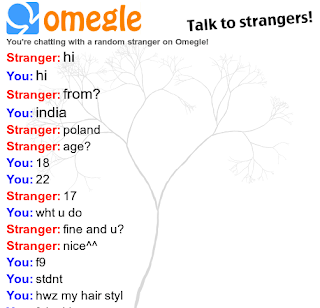
A young Indian bug hunter, has shown The Hacker News that how Omegle is saving screenshots of every 'so-called' anonymous chat session at a specific location on their web server, which could be downloaded by anyone with little knowledge of website structure.

Bug Hunter wrote a simple python script, Omegle-Chat-Hack, that automatically downloads the saved screenshots from the website.

Omegle-Leaks-Your-Chats


As a proof-of-concept, he also published some of those screenshots, showing how easily people, especially teenagers, share their personal details and contact info with strangers on a service, where they are supposed to stay anonymous.

"People on Omegle often think their chats are private and automatically get deleted once they disconnect from the conversation,". "Due to this false sense of security, people often share their sensitive information on the service. Omegle-Chat-Hack is a tool that demonstrates how insecure these online chat services are and how one can read your private messages sent over the service."
So, you should be careful with what identifiable information you are sharing over such online service while chatting with strangers. The more personal information you share, the more chances there are for others to misuse your information.

Frankly, you should take your online privacy very seriously.
facebook-hidden-chess-game.html

What can you do with Facebook Messenger?


  • Chat with your friends
  • Send GIFs, stickers, and photos
  • Make video calls
  • Send people money in Messenger

Have you ever wondered to Play a game while you chat with friends?

Yes, it is Possible.

Facebook had made it to the reality by building a hidden built-in functionality in Facebook Messenger that lets you play Chess with your friends without having to install a third-party app.

It just takes one simple step to unlock this hidden game.

All you need to do is: type "@fbchess play" and hit Enter, during a conversation, and a small square box would appear in the chat box.

Here's how to play: The person who initiated the game would be assigned "White" side, to make the first movement.

Although there is some standard algebraic Notation like:


  • B for “Bishop”
  • R for “Rook”
  • Q for “Queen”
  • K for “King”
  • N for “Knight”
  • P for “Pawn”

Pawns could be moved by issuing the simple commands with numbers (along with the vertical axes).

For  e.g. If your first play would take the second pawn from the left and move it up one block, you would write: ‘@fbchess Pb3,’ or simply ‘@fbchess b3.'

You could refer to the help section by issuing the command "@fbchess help" for the possible commands to assist you throughout the game.

It turns out that the commands are case sensitive. The board will update and notify you whether it is your turn to play.

You can undo a move with "@fbchess undo" command or by clicking the "undo" button — but your opponent has to accept the request to undo.

The game would also allow you to have a conversation during the game with your friend, resumes the game by issuing the game commands.

FB Chess is currently available for both mobile and web platforms, eliminating the need to download it separately.

This new Productive Time Killer Game initiated to entertain its users by sharpening brain while having a chat with your mate equally.
WhatsApp is one of the most popular and commonly used Instant messaging apps these days and due to its simplicity and Easy to Use interface, users are able to use it without any hassle.

By now, everyone of us has WhatsApp in our smartphones. Although each and everything is quite handy in WhatsApp, "What's the most disturbing part that you came across?" 

For me it is:

How to use two WhatsApp account in one single mobile phone?

how-to-run-multiple-whatsapp-account-on-android

If you run dual SIM in your mobile phones, you might be willing to enjoy two separate WhatsApp account for your two different telephone numbers. Isn't it?

However, this is where WhatsApp puts limitations on its users. WhatsApp users can not use more than one WhatsApp account on their mobile devices.

You are probably wondering:

"How do I find an excellent solution to this problem that actually works?"

Today, I am introducing you not one but multiple solutions to your problem that will allow you to run two WhatsApp accounts in one phone.

METHOD 1: Use Multi-User in Android Lollipop Phones

If you want to run 2 WhatsApp Accounts on One Android Phone, you can use the Multi-User Feature offered by the Android Lollipop Operating System, including Cyanogen OS and other custom ROMs. 

Follow these simple steps to begin:


  • Add Multi-User in Android Lollipop-Based smartphone. For this, just go to Settings and click on Users and then Add User.
  • Once after creating a new user, provide complete details to setup a new user account
  • Switch to the New User by pulling down the notification bar and clicking on New User icon.
  • Once turned to New User, you will be provided with an all new phone interface with default phone settings.
  • Now, Install WhatsApp in the New User Mode.
  • Once WhatsApp is downloaded, enter all the details, and that is it.

Congratulations! You have successfully installed 2 WhatsApp accounts in One Single Phone without rooting or installing any other Custom ROM.

With the multi-user feature, you can even Enjoy multiple WhatsApp accounts on your single Android device.

METHOD 2: USE SWITCHME TO RUN MULTIPLE ACCOUNTS


  • Root your Android device.
  • Make sure that you have WhatsApp app installed on your smartphone.
  • Install SwitchMe Multiple accounts on your smartphone.
  • Run SwitchMe Multiple accounts, it will ask for Superuser request that you need to grant.
  • Now create a user profile with your name in SwitchMe app. This profile will be an administrator account containing all the current apps and settings, and will also reflect your WhatsApp profile that is already installed on your smartphone.
  • Now create another profile using a different name by tapping on the Create Profile button in SwitchMe app, and then choose the Switch option by selecting this account.
  • Now your smartphone will restart automatically and once it is ready to use, install official WhatsApp again from Google Play Store and register it for the different phone number. That is it.

Congratulations!

Unlike multi-user feature in Android Lollipop, the Free version of SwitchMe allows you to enjoy only 2 WhatsApp accounts on one single phone. However, SwitchMe's paid account allows you to run multiple WhatsApp accounts.

METHOD 3: USING OGWhatsApp

OGWhatsApp is an Android app that allows you to use two separate WhatsApp accounts on your single Android device without any need to root your Android device.

While running your normal WhatsApp account on your smartphone, you can follow some simple steps (below) in order to run a different WhatsApp account on the OGWhatsApp.

Follow these simple steps to go:


  • Take a complete backup of your WhatsApp data and restore it.
  • Delete all the WhatsApp data by going to Settings>apps>WhatsApp>Clear Data.
  • Rename the /sdcard/WhatsApp directory to /sdcard/OGWhatsApp. You can use any file manager for Android to do this task, or from Windows.
  • Uninstall your original WhatsApp app from your Android device.
  • Now install OGWhatsApp in your Android smartphone.
  • Once installed, remember to verify your old number that was previously registered with the original WhatsApp to OGWhatsApp. That is it.
  • Now re-install the official WhatsApp for your other number from the play store.

Note: OGWhatsApp application for multiple WhatsApp account is not available now. So you can Choose any of the remaining two methods to run 2 WhatsApp in one mobile phone.
I have made available solutions for both users who want to use multiple WhatsApp accounts on their smartphone without rooting their Android device and with rooting their Android device respectively.

Go and enjoy WhatsApping!

Want to capture some special moments in 3D? Use Your Android But 3D capturing features is not by default in almost all android. And if you missing this cool way of capturing then don’t worry as we are here to tell you the method by which you actually click some cool pictures in 3 dimensional views that will enhance your picture realistic nature. And this will possible with cool android app that we are going to discuss right here. So have a look on complete guide discussed below to proceed.

how-to-capture-3d-pictures-in-android

How to Capture 3D Pictures In Android

The app that we are going to discuss right here will allow you to take 3D Pictures and even cool pictures of moving objects and this is done by its frame division technique by which it can join multiple pictures frames into one to give realistic 3D effect. So Follow the steps below to Proceed.

Features Of Phogy 3D Camera App:

• No special Hardware required.
• Create Unique selfies with 3D shots.
• Easy Picture Share to emails and social networking sites.
• High Quality Mp4 sharing option.
• Also creates GIF format images to share.
• Set Phogy as 3D effect live wallpapers.

How to Capture 3D Pictures In Android Using Phogy 3D Camera App:

  1. First of all download and install this cool app Phogy, 3D Camera in your android in which you want to take some amazing images in 3D views.
  2. Now launch the app after installing it on your device.
  3. Now it will display some of initial guide for taking 3D images and you just have to keep them in your mind for better photography using this app.
  4. Now time to capture some amazing 3D shots using the app and that can be done by clicking on camera button and then focus on the target.
  5. And now move devices to right side with again focus on target.
  6. Thats it now the image frames at different views will get merge up and you will have your 3D image with you that you can share on social media networks and even make it as your wallpaper.
  7. So above is all about Capture 3D Pictures In Android Using Phogy 3D Camera App, With this app that we had discussed above you can easily take some cool amazing pictures in 3D views that will look awesome and will be great for sharing with friends or setting up for live wallpapers. Hope you like this cool guide, do share with others too. Leave a comment below if you have any related queries with this.
Instant Email Address, A Great App to Generate unlimited email address with in a second. You do not have to fill any lengthy form and no need to provide your Personal info. Now a days Email address is a vital thing to create new account on various websites so Here is an awesome way via which you can generate unlimited email address.

Follow Below Few Simple Steps:

Create-Unlimited-Email-Address

  • Download Instant Email Address App {Click Here} . 
  • Once you download, Open it [ No verification or Registration required ]. 
  • Now you can see Few email address already created for you. 
  • Click on "Random address generation" to generate more email address.
Note: Click Multiple Times to Generate more email address.

  • You can also customize your account email address from "Specify account name" section. 
  • Now you can send or receive unlimited emails and generate new mail address using this app.
Internet Download Manager has a smart download logic accelerator that features intelligent dynamic file segmentation and safe multi part downloading technology to accelerate your downloads. Unlike other download accelerators and managers that segment files before downloading starts, Internet Download Manager segments downloaded files dynamically during download process.

Internet-Download-Manager-Cracked

Main Features of IDM:


  • All Popular Browsers and Applications are Supported!


Internet Download Manager has been tested with the following Browsers: Internet Explorer, MSN Explorer, AOL, Netscape Communicator, Netscape 6, Netscape 7, Mozilla, Mozilla Firefox, Mozilla Firebird, Opera, NetCaptor, UltraBrowser, Slim Browser, Avant Browser, MyIE2, Optimal Desktop, Ace Explorer, Advanced Browser, 27 Tools-in-1 Wichio Browser, WindowSurfer, 550 Access Browser, FineBrowser Freeware, Kopassa Browser, Fast Browser Pro, Enigma Browser, GoSuRF, K-Meleon, Smart Explorer, The Off By One Web Browser, Smartalec Voyager, CrystalPort AppCapture, The Family Browser, XANA Web Browser, Bluto, AutoSurf, 32bit Web Browser, BrowseMan, WrestlingBrowser, Eminem Browser, UltraBrowser, Cygsoft LDAP Browser, and Net M@nager. Internet Download Manager supports all versions of popular browsers, and can be integrated into any 3rd party Internet applications.

  • Easy Downloading with One Click

When you click on a download link in a browser, IDM will take over the download and accelerate it. IDM supports HTTP, FTP, HTTPS and MMS protocols.

• Download Speed Acceleration. 

Internet Download Manager can accelerate downloads by up to 5 times due to its intelligent dynamic file segmentation technology. Unlike other download managers and accelerators, Internet Download Manager segments downloaded files dynamically during download process and reuses available connections without additional connect and login stages to achieve best acceleration performance.

• Download Resume. 

Internet Download Manager will resume unfinished download from the place where they left off.

• YouTube Grabber. 

Internet Download Manager can grab FLV videos from popular sites like YouTube, MySpaceTV, and Google Video.

• Simple installation wizard. 

Quick and easy installation program will make necessary settings for you, and check your connection at the end to ensure trouble free installation of Internet Download Manager.

• Drag and Drop. 

You may simply drag and drop links to IDM, and drag and drop downloaded files out of Internet Download Manager.

• Automatic Antivirus checking. 

Antivirus checking makes your downloads free from viruses and Trojans.

• Advanced Browser Integration. 

When enabled, the feature can be used to catch any download from any application. None of the download managers have this feature.

• Built-in Scheduler. 

Internet Download Manager can connect to the Internet at a set time, download the files you want, disconnect, or shut down your computer when it's done.

• IDM includes Website Spider and Grabber. 

IDM downloads all required files that are specified with filters from web sites, for example, all pictures from a web site, or subsets of web sites, or complete websites for offline browsing. It's possible to schedule multiple grabber projects to run them once at a specified time, stop them at a specified time, or run periodically to synchronize changes.

• IDM Supports many types of Proxy Servers.

For example: IDM works with Microsoft ISA, and FTP proxy servers.

• IDM Supports Main Authentication Protocols. 

Basic, Negotiate, NTLM, and Keberos. Thus, IDM can access many Internet and proxy servers using login name and password.

• Download All Features. 

IDM can add all downloads linked to the current page. It's easy to download multiple files with this feature.

• Customizable Interface. 

You may choose the order, and what buttons and columns appear on the main IDM window.

• Download Categories. 

Internet Download Manager can be used to organize downloads automatically using defined download categories.

• Quick Update Feature. 

Quick update may check for new versions of IDM and update IDM once per week.

• Download Limits. 

Progressive downloading with quotas feature. The feature is useful for connections that use some kind of fair access policy (or FAP) like Direcway, Direct PC, Hughes, etc.

• IDM is Multilingual. 

IDM is translated to Albanian, Arabic, Azerbaijan, Bosnian, Bulgarian, Chinese, Croatian, Czech, Danish, Dutch, Farsi, French, German, Greek, Hebrew, Hungarian, Italian, Japanese, Korean, Lithuanian, Macedonian, Norwegian, Polish, Portuguese, Romanian, Russian, Serbian, Slovak, Slovenian, Spanish, Thai, Turkish, and Uzbek languages.

What's New in Version 6.25 Build 3:
  1. Added support for Firefox 43 and Sea Monkey 2.39, 2.40, 2.41.
  2. Lowered CPU consumption 
  3. Added support for new types of video streaming sites 
  4. Fixed bugs 

DOWNLOAD IDM From Here:

How to Install IDM:

Note: Please strictly Follow the Installation guide to avoid errors and No need to Close/Exit IDM if Running.
  • Install IDM by running "idman625build3.exe"
  • Run "32bit Patch build 03.exe" if you're using 32bit operating system
OR

  • Run "64bit Patch build 03.exe" if you're using 64bit operating system
  • Done, Enjoy simplest IDM installation ever.

AppLock is one of the android security apps used by most of the android users. AppLock helps us to lock Photos, Videos, apps etc. and protects our privacy. However, AppLock will not give 100% security to the apps. In this article, I’ll explain How to Hack AppLock android app. No need to uninstall the app or no root is required. Well! let us see How to Bypass AppLock android app without knowing the Password.

hack-applock-in-android
NOTE: This Trick will not work if the Settings are Locked by the User.

How To Hack AppLock in Android?

1. Take the Target Phone in which you want to Hack AppLock.2. Now go to Settings and then tap on Apps or Applications.
3. You will see AppLock app under downloaded section and tap on it.
hack-applock-in-android

4. After that tap on Force stop option.
hack-applock-in-android
With this AppLock application is currently in the idle state. You can open locked apps without entering the password.
If you are an android user, then you might be aware of built in Android Lock Pattern Lock. In Windows, you have Password based lock security But what if there is a chance to add Android Like: Pattern Lock on Windows. In this article, I’ll show you How to set Pattern Lock on Windows XP/Vista/7/8/8.1 using Eusing Maze Lock.

What is Eusing Maze Lock?

Eusing Maze Lock is a free and easy to use tool which enables you to add an android Like: Pattern Lock to Windows with this you can add an Automatic Lock on Windows at startup or after a specified time. You can use 3 types of grids (3X3, 4X4 or 5X5) in Pattern Lock. You can set an alert message if the Password entered was wrong for specified number of times. You can also backup your pattern as BMP image. Eusing Maze Lock has a feature to add an image as background for the lock screen. 

How to Set Pattern Lock on Windows:

  • First Download Eusing Maze Lock {Click Here} and install it on your computer. Now, you can see Maze lock icon in your system tray at right bottom corner.
how-to-set-pattern-lock-on-windows

  • Right click on Maze Lock icon and select Configure (or simply press Windows key + C).
how-to-set-pattern-lock-on-windows
  • Now, Maze Lock configure window appears. There you’ll see Default lock pattern. Just click on Reset Pattern to reset the current pattern and for adding a new one.
how-to-set-pattern-lock-on-windows
  • Now, Set a new Pattern by dragging with your mouse on the grid. By clicking on Backup Pattern, you can save your pattern as a BMP image. But make sure that you save your pattern at a safe place.
how-to-set-pattern-lock-on-windows
  • After setting up a new Pattern, click on General Tab. Here you have to set Maze lock settings Like: Turning on Auto Lock at windows startup/after specified time, adding alert text…
how-to-set-pattern-lock-on-windows
  • If you want to change Background, you can add a Background image for your Lock screen. For that click on Background tab and click on Change Image button, upload image and click on OK button.
how-to-set-pattern-lock-on-windows
  • You’ve added Lock Pattern security on your Windows. Now Press windows key + A to open your lock screen and use your newly created pattern to unlock your system.